On-Page SEO: Complete Beginner’s Guide to Boost Your Website Traffic
Intro
Are you a blogger, small-business owner or content creator trying to get more visitors from Google? If yes, this guide is for you.
You may have heard about SEO and how “on-page SEO” can help your site rank higher. But often you don’t know where to start — what exactly to optimise and how.
In this post, I’ll walk you through simple, step-by-step tips to optimise your pages. With this, you’ll see how to make your content search engine-friendly without complicated jargon or technical headaches.
What is On-Page SEO — in simple words
On-page SEO means optimising the elements on your own web page — like content, headings, images, meta tags, URL — so that search engines (and users) understand what your page is about and show it to the right audience.
It’s different from off-page SEO (like backlinks). On-page SEO is fully in your control.
Why On-Page SEO matters
- ✅ Helps search engines understand your content better — increasing chances to rank higher. GeeksforGeeks+1
- ✅ Improves user experience: well-structured content, easy-to-read paragraphs and readability keep readers engaged. TICE India+1
- ✅ Loads faster and works well on mobiles — which search engines like. GeeksforGeeks+1
On-Page SEO Checklist — What to Optimise
Here’s a checklist of the most important things you should get right for on-page SEO:
| Short, clean URLs with target keywords make pages understandable & clickable. vazoola.com+1 | Why It Matters |
|---|---|
| Title Tag + H1 Tag | Title tag appears in search results; H1 shows main heading on page — helps search engines & users know what your page is about. Semrush+1 |
| URL Structure | Visuals improve readability, and optimised images (with alt text) help SEO + accessibility. SEOBoost -+1 |
| Heading Tags (H2, H3 …) | Break content into sections — better readability and SEO structure. Techmagnate+1 |
| Keyword Placement | Natural use of main + related keywords in title, headings, first 100 words, body — helps search relevance. TICE India+1 |
| High-Quality & Useful Content | Content should truly answer questions and add value. Bigrock Solutions+1 |
| Images / Infographics | Help users navigate and build credibility by referencing quality sources. Abstract Infosys+1 |
| Internal & External Links | Help users navigate, and build credibility by referencing quality sources. Abstract Infosys+1 |
| Meta Description | Appears under title in search results — helps improve click-through rates. Semrush+1 |
| Mobile-Friendly + Fast Loading | Important for user experience — and search engines favour pages that load fast and work well on mobile. GeeksforGeeks+1 |
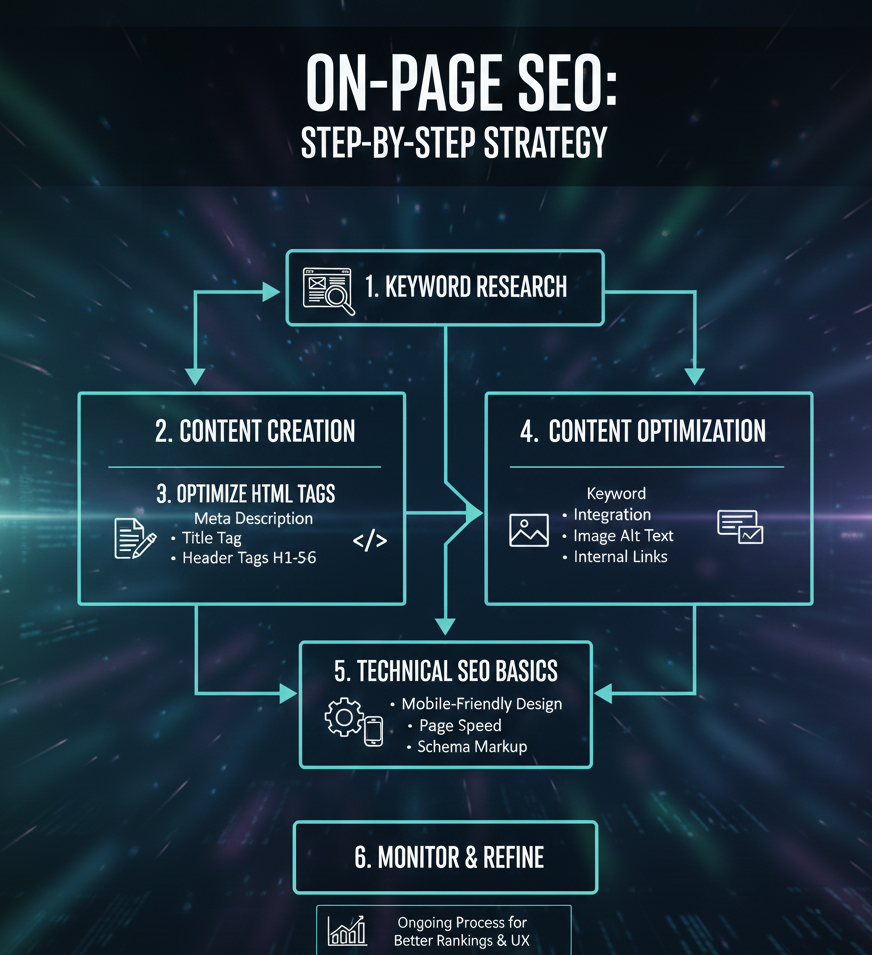
Step-by-Step On-Page SEO Strategy (for your blog post)
1. Choose and place your main keyword
Pick a main keyword (for example: “on-page SEO”, or “on page SEO guide for beginners”).
- Include it in the title tag, H1 heading, first 100 words of intro, and sometimes throughout content — but keep it natural.
- Use a mix of related phrases or synonyms (LSI keywords) to avoid repetition. vazoola.com+1
2. Structure your content with headings & sub-headings
Use:
- H1 — for the main title (only one).
- H2 — for major sections (what is, why, checklist, steps, FAQs, etc.).
- H3/H4 — for sub-points inside those sections. Techmagnate+1
This helps both readers and search engines understand your content flow.
3. Write useful, reader-friendly text
- Use short paragraphs, simple words, bullet points, tables, and listicles — they make the post easier to read.
- Answer real questions that your readers have. Provide clear explanations.
4. Add images/infographics
Visuals break the monotony and help explain better. For example:
- A simple infographic showing “On-page SEO Checklist.”
- A screenshot or diagram of good vs bad URL structure
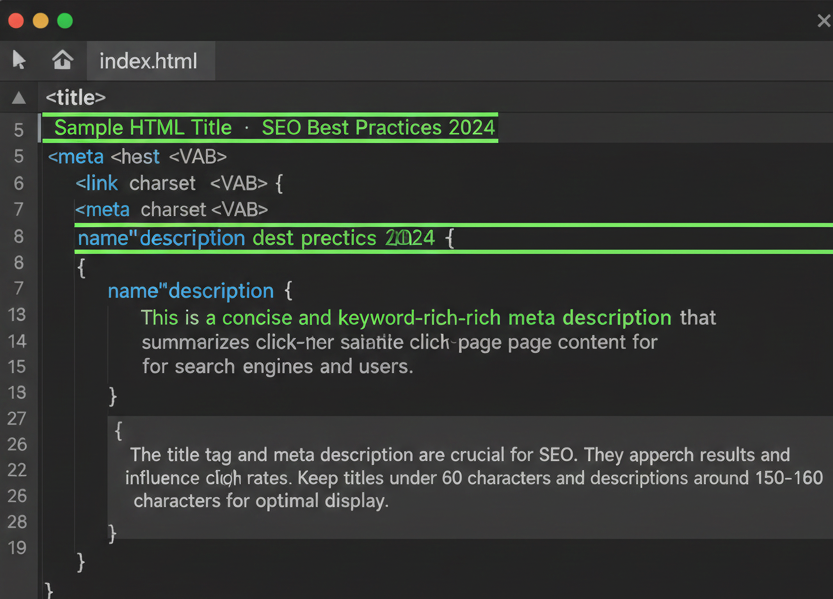
- A sample HTML code snippet of the title tag/meta description
For each image, use a descriptive filename and alt attribute — e.g., alt=” on page SEO checklist infographic” or alt=”example of SEO-friendly URL”. This helps with accessibility and image SEO. SEOBoost -+1
5. Optimize meta tags & URL
- Make URL short, descriptive, and include the main keyword (e.g.
example.com/on-page-seo-guide) vazoola.com+1 - Write title tag (50–60 chars) with keyword, and a compelling meta description (≈ 155–160 chars) summarizing the post, with a hook or call-to-action. Semrush+1
6. Use internal & external links
- Link to other relevant posts/pages on your site (internal). Helps readers and distributes SEO value. Abstract Infosys+1
- Link to credible external sources when you reference facts or guides. Builds authority and trust. Abstract Infosys+1
7. Make sure the page loads fast & is mobile-friendly
Compress images, avoid heavy files, use responsive design — this improves user experience and helps SEO. GeeksforGeeks+1
Sample Blog Post (with ~1.5% Keyword Density)
Here’s how your post might start (first few paragraphs + structure) — you can build out the rest similarly.
Note: In the example below, the main keyword is on-page SEO — try to keep density around 1.5% by repeating naturally every 100–150 words or so.
Intro
If you are a blogger, small business owner or webmaster trying to grow your website, you may have searched “how to do on-page SEO” — but felt confused by all the jargon. In this complete on-page SEO guide, I’ll show simple steps to optimize your pages so that search engines understand your content better, and you attract more visitors.
Whether you are writing your first blog post or updating old pages, this on-page SEO checklist will make your life easier and help you rank higher in search results.
H2 What is On-Page SEO?
On-page SEO refers to the optimization of elements directly on your web page — like content, headings, images, URLs and meta tags — so that search engines and users both understand what your page is about. When you get on-page SEO right, your page becomes more visible, trustworthy and user-friendly.
H2 Why On-Page SEO Matters
On-page SEO brings many benefits:
- Improved search engine rankings and more organic traffic.
- Better user experience with clear structure and readability.
- Faster loading speed and mobile-friendly pages — important in today’s mobile-first world.
H2 On-Page SEO Checklist
(Here insert the checklist table from above)
H2 Step-by-Step On-Page SEO Strategy
(Then expand each step: keyword, headings, content, meta tags, images, links, speed)
(Add relevant images/infographics with alt tags at appropriate places — e.g. a checklist infographic, example URLs etc.)
Common Questions about On-Page SEO
Q: How many times should I use the main keyword?
A: Use your main keyword naturally — for example, in the title, first 100 words, a few times in the body and maybe once in sub-headings. Avoid over-stuffing. — That’s what good on-page SEO is about.
Q: Should I use images in every blog post?
A: Yes — images or infographics make your content more engaging. Just optimize them: compress file size, use descriptive filenames and add proper alt text.
Q: Does on-page SEO alone guarantee ranking on Google?
A: Not always. On-page SEO helps a lot — but search engines also consider many other factors (links, domain authority, content freshness, etc.). Still, without proper on-page SEO, your site will struggle.
Q: What is the difference between title tag and H1 tag?
A: A title tag is part of the HTML metadata — it appears in search results and browser tabs. H1 is the main heading visible on the page itself. Both should include your main keyword.
If you found this on-page SEO guide helpful, why not try it now on your next blog post or page?
➡️ Start by optimizing your title, headings, URL and meta description. Then add images with alt text, internal links, and check your page speed.
If you’d like free feedback on your draft (or help with keyword research), drop a comment below — I’d be happy to help you out!